Bio Page blocks: what each one does
The 21 block types in the Bio Page editor, from Profile and Button to Price list, Opening hours and Save contact, and how to add, reorder, schedule and remove them.
Updated October 30, 2026
A Bio Page is built from blocks stacked from top to bottom. On the Blocks tab, click Add block and pick a type. Drag blocks in Your blocks to reorder them, and tap a block (in the list or the preview) to edit it. The trash icon (Delete block) removes it.
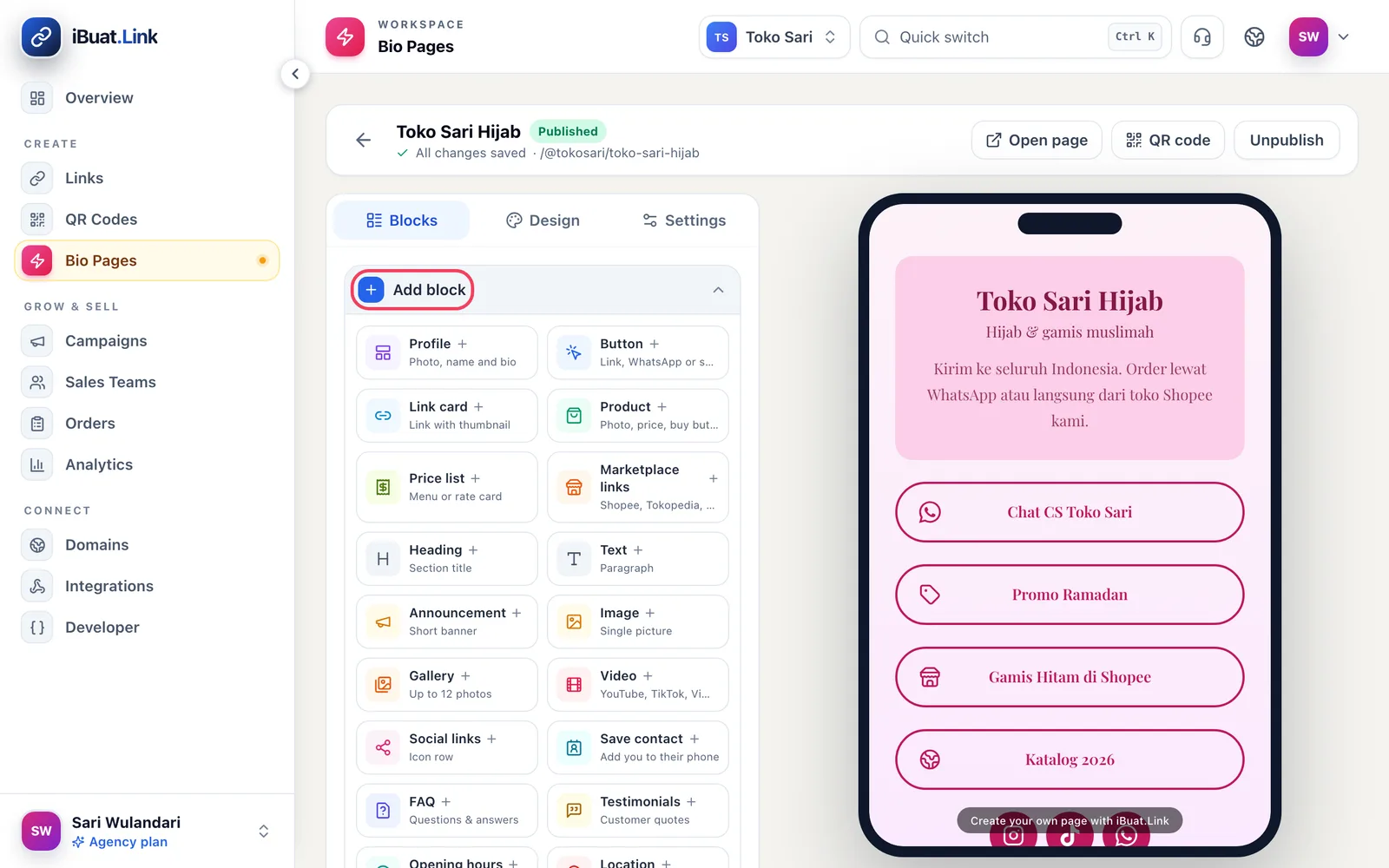
| Block | What it shows | Options |
|---|---|---|
| Profile | Photo, name, title and bio | Optional cover image, background and text color |
| Button | A link button | Links to a Website, WhatsApp, Marketplace or Short link. Icon, and Solid, Outline or Text only style |
| Marketplace links | Buttons to your stores on Shopee, Tokopedia, TikTok Shop, Lazada, Blibli, Bukalapak, Amazon, Etsy, eBay or another site | Up to 8 stores, as a list or a 2-column grid |
| Link card | A link with a thumbnail | Title, description, Compact or Featured layout |
| Product | Photo, price and a buy button | Original price (optional), currency, Button label and Buy link |
| Heading | A section title | Large, Medium or Small |
| Text | A paragraph | Alignment and color |
| Image | One picture | Maximum width, Square, Rounded or Circle |
| Gallery | Up to 12 photos | Grid (2 or 3 columns) or Swipe |
| Video | YouTube (including Shorts), TikTok or Vimeo | Paste the video link |
| Social links | A row of icons | Up to 10 links |
| FAQ | Questions & answers | Up to 15 questions |
| Price list | A menu or rate card, with prices | Up to 6 sections (Add section) and 40 items (Add item). Each item has a name, an optional description and a price with an optional unit, like /kg |
| Opening hours | Your hours for each day of the week | Closed days, hours that run past midnight, Time zone, and Copy Monday to Tue–Fri. Visitors see Open now while you’re open |
| Location | Your address with Open in Maps and Directions buttons | Google Maps link (optional) and a short note. No map is shown on the page |
| Testimonials | Customer quotes | Up to 10, each with a name, an optional 1–5 star rating and a short detail. List or Swipe |
| Save contact | A button that saves your details to the visitor’s phone as a contact | Name, phone, email, company, job title, website and address. A phone number or an email is required |
| Countdown | Days, hours, minutes and seconds to a date | When it ends, show your own message, or turn on Hide the block when it ends |
| Announcement | A short banner | Info, Promo or Warning style, and Add a link (optional) |
| Divider | A thin line | Thickness and color |
| Spacer | Empty space | Height |
Which blocks each plan can add
- Every plan, Free included: Profile, Heading, Text, Button, Marketplace links, Social links, Image, Link card, Price list, Opening hours, Location, Testimonials, Save contact, Countdown, Announcement, Divider and Spacer, as many as you like (up to 100 blocks per page).
- Product: up to 3 per page on Free, no limit from Creator. A Price list block doesn’t count toward these 3.
- Video, Gallery and FAQ blocks, and a Schedule on any block, are available from Creator. On Free they show a lock and a Creator badge in Add block.
- Pages you already have keep their blocks. If a page got these blocks before (or before you moved to Free), they stay on your public page, and you can still edit, move or delete them. A schedule set earlier keeps working and can be cleared. You just can’t add new ones until you upgrade.
Show a block only for a while
From Creator, every block has a Schedule section with Show from and Show until, in your local time. Leave both empty to always show it. In Your blocks, a scheduled block is marked Scheduled, or Hidden now when it’s outside its window. Handy for a flash sale or a holiday menu.
Clicks per block
Button, Social links, Link card, Product, Marketplace links (per store), Location (Open in Maps and Directions), Save contact and Announcement (its link) blocks show their clicks from the last 30 days under Performance, and in the page’s analytics.
Limits
- Up to 100 blocks per page.
- Up to 3 Product blocks per page on Free.
- Images: PNG, JPG, WebP or GIF up to 1.4 MB, at most 6000 × 6000 pixels.
- A Button can also open a short link, which is how you give it Smart Route or Sales Router. See WhatsApp and Sales Router buttons.
Related articles
- Create a Bio PageBuild a link-in-bio page from a ready-made template or a blank page, then add your links, WhatsApp and products. It stays a draft until you publish it.
- Change your Bio Page design: themes, fonts and colorsApply one of 10 themes, then fine-tune the background, font, text color and button shape on the Design tab of the Bio Page editor.
- Add WhatsApp, Smart Route or Sales Router buttons to a Bio PageA Button block can open one WhatsApp chat directly, or open one of your short links so it follows Smart Route rules or shares chats across a Sales Team.
- Publish your Bio Page and choose its URLPublish a draft so visitors can see it, find and change its address (ibuat.link/@username/slug), or show the page on your own domain.
Still need help?
Send us a ticket from your dashboard: the headset button at the top right, then Contact support. We reply there and by email.