Change your Bio Page design: themes, fonts and colors
Apply one of 10 themes, then fine-tune the background, font, text color and button shape on the Design tab of the Bio Page editor.
Updated October 12, 2026
Open your Bio Page in the editor and go to the Design tab. Changes show in the phone preview right away and save automatically.
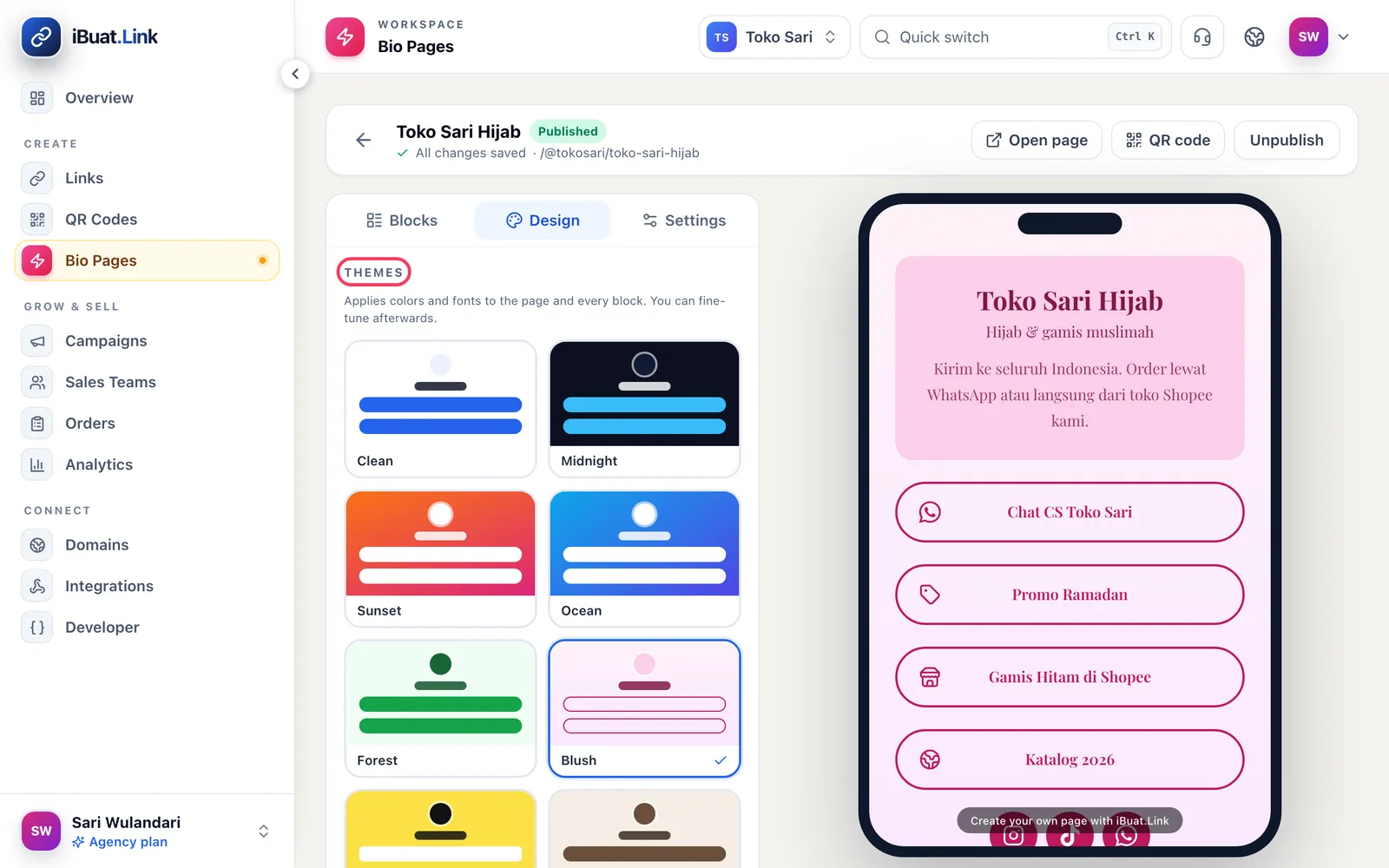
Themes
Clean, Midnight, Sunset, Ocean, Forest, Blush, Bold, Coffee, Lavender and Mono. A theme sets the colors and font of the page and every block, so apply it first and fine-tune after.
Background
Solid, Gradient (From, To and Angle) or Image. With an image you can also Darken image so text stays readable.
Text & font
Pick a Font (System, Inter, Poppins, DM Sans, Space Grotesk, Nunito, Playfair Display, Lora, Georgia, Arial or Helvetica) and the Page text color.
Buttons & cards
Corner shape: Square, Rounded or Pill. Shadow: None, Soft or Hard.
Templates and themes
A template is picked once, when you create the page, and gives you example blocks plus a look. A theme can be applied any time and only changes the look, never your text or links.
Colors for one block
Most blocks have their own color settings, such as Button color and Label color on a Button. Select the block on the Blocks tab to change them.
The small iBuat.Link badge at the bottom of the page can be hidden on paid plans, with Remove iBuat.Link branding on the Settings tab.
Full tutorialHow to build a link in bio for affiliate contentRead the guideRelated articles
- Bio Page blocks: what each one doesThe 21 block types in the Bio Page editor, from Profile and Button to Price list, Opening hours and Save contact, and how to add, reorder, schedule and remove them.
- Create a Bio PageBuild a link-in-bio page from a ready-made template or a blank page, then add your links, WhatsApp and products. It stays a draft until you publish it.
- Publish your Bio Page and choose its URLPublish a draft so visitors can see it, find and change its address (ibuat.link/@username/slug), or show the page on your own domain.
- Plans and their limitsWhat Free, Creator, Pro, Business and Agency each include: links, QR codes, Bio Pages, tracked clicks, analytics history, domains, orders and more.
Still need help?
Send us a ticket from your dashboard: the headset button at the top right, then Contact support. We reply there and by email.