Webhook deliveries, retries and failures
How to read a webhook’s Logs, how long iBuat.Link keeps retrying, what happens when a delivery fails for good, and how to send a test.
Updated October 12, 2026
Every event becomes a delivery that iBuat.Link sends in the background and retries if your endpoint doesn’t answer. To see them, click the clock icon (Logs) on the webhook’s row in Integrations.
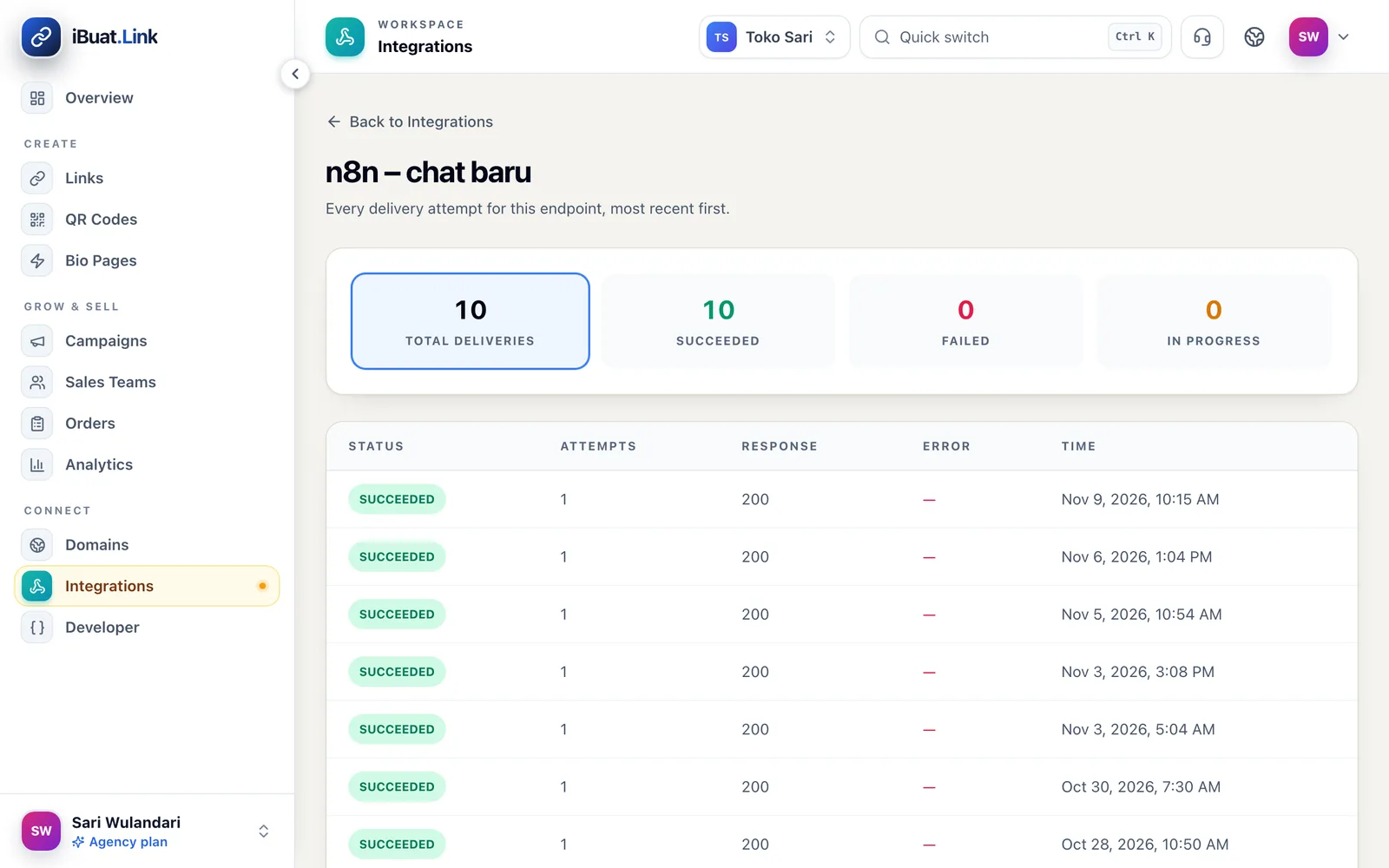
The Logs page
At the top are Total deliveries, Succeeded, Failed and In progress. Click one to filter the list. Each row shows the Status, the number of Attempts, the HTTP Response from your endpoint, the Error and the Time.
| Status | Meaning |
|---|---|
| PENDING | Queued, not sent yet. |
| DELIVERING | Being sent right now. |
| RETRYING | The last attempt failed. Another one is scheduled. |
| SUCCEEDED | Your endpoint answered with a 2xx status. |
| FAILED | No more attempts will be made. |
Retries
- Your endpoint has 8 seconds to answer with a 2xx status. Redirects are not followed, so a 3xx counts as a failure.
- A failed delivery is tried up to 10 times, waiting 30 seconds, then 1, 2, 4, 8, 16 and 32 minutes, then 1 hour twice. That covers about 3 hours.
- A 4xx answer (except 408 and 429) means the request itself was refused, so it fails right away without retrying.
- When a delivery fails for good, the workspace owner gets an email, at most once a day per webhook. The webhook stays enabled.
Send a test
Click the paper plane icon (Send test) on the row. iBuat.Link queues a signed delivery with the event name sales_assignment.test and test: true in the body, then shows it in Logs like any other delivery. The webhook must be enabled. Test failures never trigger the email.
Good to know
- Use x-ibuat-event-id to skip duplicates. A retry of the same event keeps the same id.
- If your plan no longer includes integrations, deliveries are held, not dropped, and go out if you upgrade again.
- Logs are kept for 180 days on Pro and 365 days on Business and Agency.
Related articles
- Add a webhookA webhook sends an HTTPS POST to n8n, your CRM or your own server when something happens in iBuat.Link. Available on Pro and higher plans.
- Verify webhook signaturesCheck the x-ibuat-signature header so your endpoint only trusts requests that really come from iBuat.Link.
- Webhook events and what they containThe 10 events a webhook can send, when each one fires, what the JSON body looks like and how the Sales Team filter works.
- Contact supportOpen a ticket from the headset button in the dashboard header. Replies show up in the dashboard and in your email, usually within one business day.
Still need help?
Send us a ticket from your dashboard: the headset button at the top right, then Contact support. We reply there and by email.