Create a short link
Every field in the Create short link form: destination, title, custom slug, campaign, custom domain, expiration date and description, plus the limits that apply.
Updated October 12, 2026
Go to Links in the sidebar and click Create link. Only the destination is required; you can fill in the rest now or later.
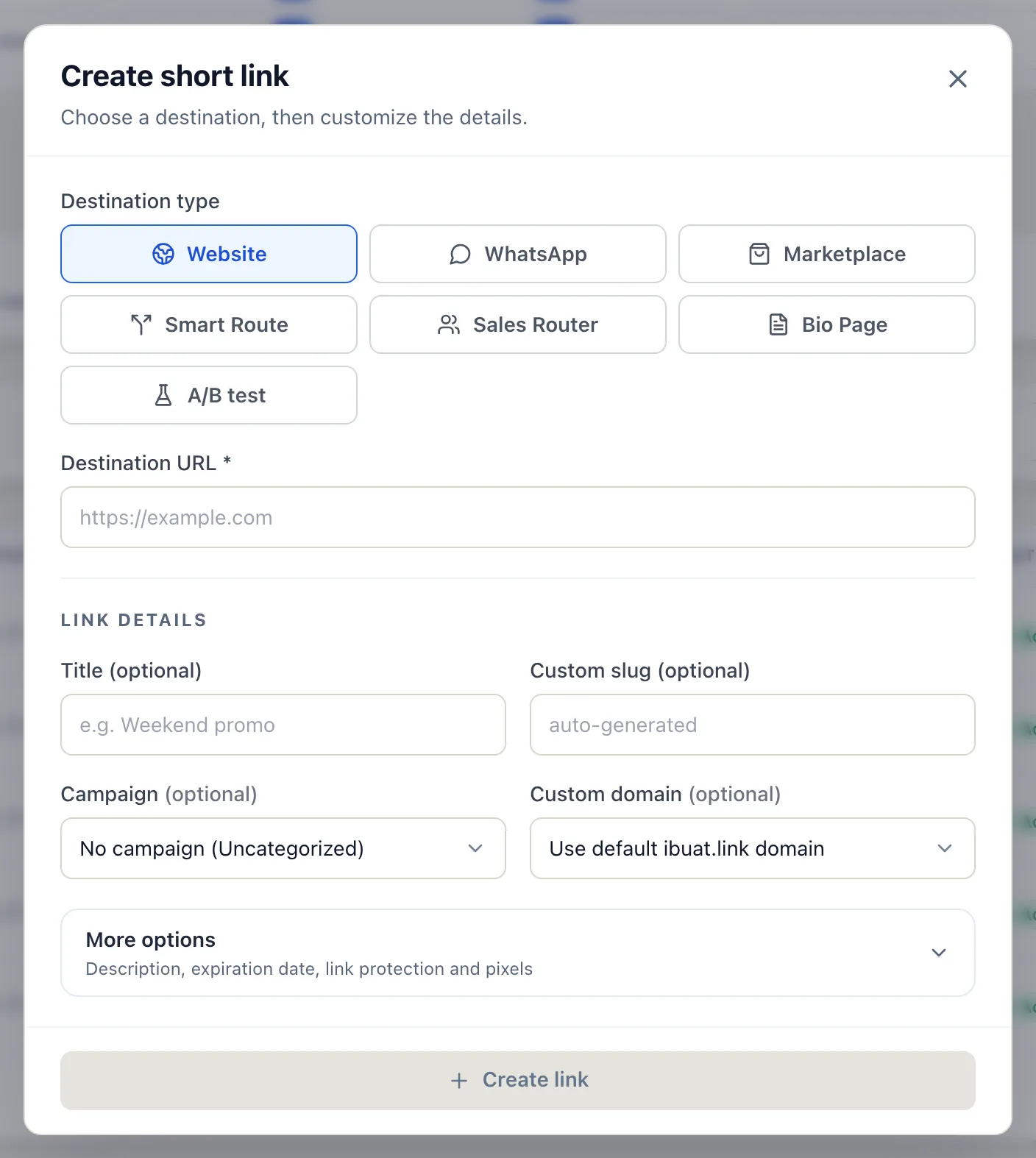
- 1
Pick a destination type
Website, WhatsApp, Marketplace, Smart Route, Sales Router or Bio Page. The fields below change to match. See Link destination types.
- 2
Fill in the destination
For a website, paste the full address into Destination URL, starting with http:// or https://.
- 3
Link details
Title (optional) is a name only you see, up to 100 characters. Custom slug (optional) sets the end of the link, as in ibuat.link/r/spring-sale; leave it empty for a random 7-character one. Campaign files the link under a campaign; with No campaign it goes to Uncategorized.
- 4
Custom domain
With a verified domain, Custom domain (optional) lets you pick it, for an address like link.yourstore.example/r/spring-sale. Otherwise the default ibuat.link domain is used.
- 5
More options
Open More options for Expiration date (the link stops working after it) and Description, a private note of up to 1,000 characters.
- 6
Create
Click Create link. Copy the new link from the list with the copy icon (Copy link).
Limits to know
- Each short link counts toward your plan’s link limit until you delete it, disabled and expired links included. See Plans and limits.
- Each plan also has an hourly limit on new links, to stop abuse. If you reach it, wait a while and try again.
- You need a confirmed email address to create links.
- Some destinations are refused: links from other shorteners, another iBuat.Link short link, private network addresses and pages flagged as unsafe. See Link safety checks.
Related articles
- Choose your own link ending (custom slug)The rules for the custom slug at the end of a short link: 3–50 lowercase letters, numbers or hyphens, not a reserved word, and not used before by anyone.
- Link destination typesThe six destination types in the link form (Website, WhatsApp, Marketplace, Smart Route, Sales Router and Bio Page) and what each one needs.
- Edit a short linkChange a link’s destination, title, status, campaign, domain or expiry. The short address stays the same, so everyone who already has it gets the new destination.
- Import many links from a CSVCreate up to 500 short links at once from a CSV file or rows pasted from Google Sheets or Excel. Available on Creator and up.
Still need help?
Send us a ticket from your dashboard: the headset button at the top right, then Contact support. We reply there and by email.